
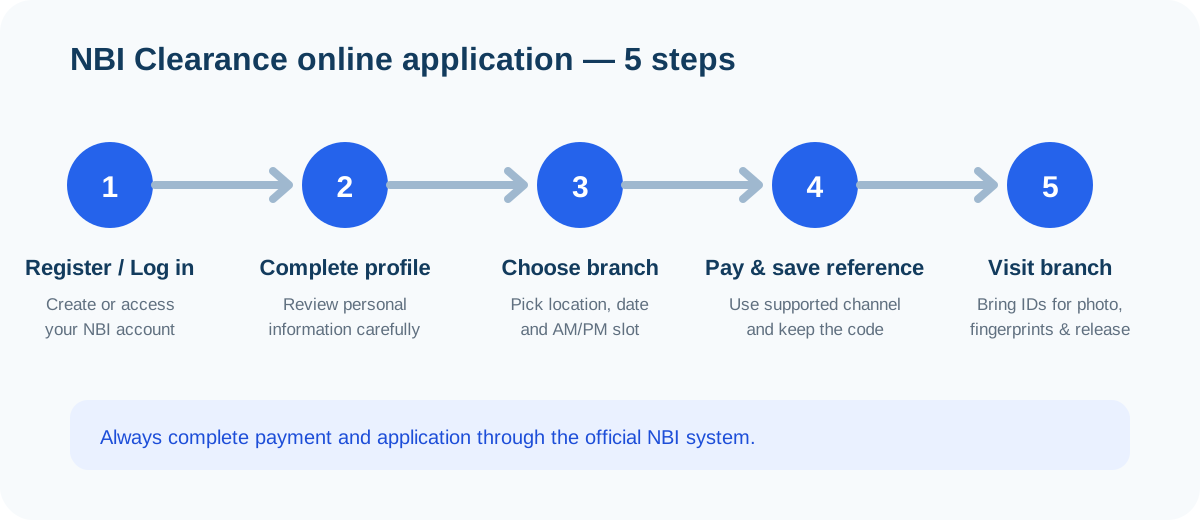
Quick answer
Check where the OTP should arrive
The current registration flow may use contact details entered or already associated with the account. Read the official screen carefully to identify whether it is asking you to check a phone or email address. This independent guide cannot view the destination or access the account.
- Check the spelling and format of newly entered contact details.
- If email is involved, check inbox, spam, junk and filtered folders.
- If a mobile number is involved, confirm that the phone has signal and can receive ordinary messages.
- If the portal shows masked contact details, confirm that they belong to you.
Email-specific checks
Search your mailbox for recent messages from the NBI domain, including the spam and promotions tabs. Some email providers quietly filter automated codes, so add the sender to your contacts if your provider allows it. Also confirm the address has no typo — one wrong letter sends the code to someone else's inbox.
SMS-specific checks
Confirm the phone has signal and is not in airplane or do-not-disturb mode. Check that your number is not blocking unknown senders, and that the SIM in the phone matches the number on the account. If you recently changed SIM cards or carriers, the number on the NBI account may no longer be the one in your hand.
Resend the OTP carefully
Allow the current request to complete before using the official resend control. This guide does not claim an exact OTP delivery time. Repeatedly generating codes can make it unclear which code belongs to the current session, so use the newest code delivered after your most recent official request.
Return to the NBI Clearance login guide or the online registration guide if the problem is tied to a particular account step.
One resend at a time
Request a single fresh code, wait for it to arrive, and enter that code only. Requesting three or four codes in a row usually makes things worse: each new code can invalidate the previous ones, and you will not know which one the portal expects.
Browser and session checks
- Confirm the browser address is on the official `clearance.nbi.gov.ph` domain.
- Keep one registration or login tab open instead of starting several sessions.
- If the page has expired, reopen the official portal and begin the verification step again.
- Try a current browser or another trusted device.
- Try another trusted internet connection if the portal is not responding.
- Do not use an unofficial form, browser extension or remote-access helper.
Why multiple tabs cause trouble
Each open session can hold its own verification state. If you requested a code in one tab and try to enter it in another, the portal may reject it as belonging to a different session. Close the extras, start the verification step fresh in a single tab, and complete it there.
OTP problems during registration vs login
| Situation | Usual cause | What to check |
|---|---|---|
| Code never arrives during new registration | Typo in the contact details just entered | Re-read the number or email shown on the confirmation screen |
| Code never arrives on an existing account | Old number or email still on file | Check whether you still control the masked contact shown |
| Code arrives but is rejected | Expired code or wrong session | Use the newest code in the same tab, before it expires |
| Code arrives very late | Carrier or provider delay | Request one fresh code and enter the newest one only |
Registration-time failures
During a new registration, the OTP goes to details you just typed. A single wrong digit is the most common reason nothing arrives. Go back one step in the official flow, verify the contact details character by character, and only then request the code.
Login-time failures
On an existing account, the OTP goes to details saved earlier — which may be an old number or email you no longer use. If the masked contact shown by the portal is not yours anymore, resending will not help; you need the official recovery route covered below.
Wrong or old contact details
If the OTP is going to a phone number or email address you no longer control, ordinary resend attempts will not solve the ownership problem. Use the recovery option offered by the official portal or contact official NBI support. Do not create inaccurate identity details or ask a stranger to receive the code.
Existing-account issues should be handled through official recovery rather than creating repeated accounts that may separate you from a paid transaction or previous record.
If the OTP never arrives
- Record the approximate date, time and step where the failure occurred.
- Take a redacted screenshot that does not expose a password, OTP or complete identity details.
- Check the NBI Clearance Help Center for related login or portal problems.
- If account-specific action is required, use the official NBI contact page linked here—not this website’s contact form—to recover the government account.
When to contact official support
If you have confirmed the destination is correct, the signal and filters are fine, and a careful resend still produces nothing, the problem is account-side and needs official help. Prepare your redacted notes and use the official contact channels — not social-media pages claiming to be NBI support.
OTP FAQs
How long should an NBI OTP take to arrive?
This guide does not promise an exact delivery time. Allow the current request to complete, check the correct phone or email channel and use the official resend control carefully if the code does not arrive.
Should I keep requesting new OTP codes?
No. Repeated requests can create several codes or make it unclear which code is current. Request a fresh code carefully through the official portal, then use the newest code delivered for that session.
What if my old phone number or email is on the NBI account?
Use the official account recovery or NBI contact route. Do not create false details or give another person control of the OTP channel to bypass account verification.
Can NBI Clearance Help receive or verify my OTP?
No. This is an independent information website. Never send an OTP, password, ID scan or full account credentials to this site, a fixer or an unofficial support account.
The OTP arrived but the portal says it is wrong. What now?
Use the newest code from your most recent official request, enter it before it expires, and check for typing errors. If it still fails, request one fresh code through the official portal and use that one only.
Can I change the mobile number or email on my NBI account myself?
Use the official account recovery or contact options provided by NBI. Do not create a second account with new details just to bypass verification, since that can separate you from a paid transaction or previous record.
Is it safe to use someone else's phone number to receive my OTP?
No. Giving another person control of your verification channel exposes your NBI account and identity details. Keep the OTP channel on a number or email you personally control.